Monday, June 4, 2018

Creating Custom Webadi Template in Oracle Apps

Creating Custom Webadi Template in Oracle Apps

Custom Webadi creation in Oracle Apps

Webadi Summary:

Oracle Web ADI  is being used by the End Users in the Oracle E-Business Suite to perform some of their day-to-day data entry tasks in the commonly used Microsoft desktop applications like Excel and upload the data to EBS.

To create the custom Web ADI,We need two responsibilities.
  1. Desktop Integration Manager(lets you creating/Managing Integrator and parameters)
  2. Desktop Integrator(lets you create Document, layout, Mapping, Setup options etc.,)
Below are the steps to create the Web ADI

1.Create database table: We use this table to load the data by using Web ADI template.

Table Script:

CREATE TABLE xxcust_stage_table
(
 project_number VARCHAR2(100)
,task_number VARCHAR2(100)
,description VARCHAR2(100)
);

2. Create Package: We use this package to do the validations before uploading the data to the custom table.

Package Specification:

CREATE OR REPLACE PACKAGE xxcust_webadi_demo_pkg
AS
/*
 * Developer      :
 * Client/Project :
 * Database       :
 * Date           :
 * Description    : This package contains the logic for Web ADI upload
 * Issue          :
 * Version Control:
 * Author      Version      Date         Change
 * -------      -------      --------     -------
*/

   PROCEDURE xxcust_webadi_stg (
      icproject_number  VARCHAR2
     ,ictask_number     VARCHAR2
     ,icdescription     VARCHAR2
   );                       
END;                                                        
/

Package Body:

CREATE OR REPLACE PACKAGE BODY APPS.xxcust_webadi_demo_pkg
AS
/*
 * Developer      :
 * Client/Project :
 * Database       :
 * Date           :
 * Description    : This package contains the logic for webadi upload
 * Issue          :
 * Version Control:
 * Authour      Version      Date         Change
 * -------      -------      --------     -------
*/
   PROCEDURE project_validation (
  p_project_number VARCHAR2
 ,p_proj_valid     OUT  NUMBER
   )
   IS
   BEGIN
      SELECT COUNT (1)
        INTO p_proj_valid
        FROM pa_projects_all pa
       WHERE pa.segment1 = p_project_number
         AND pa.project_status_code = 'APPROVED'
         AND TRUNC (sysdate) BETWEEN pa.start_date AND NVL (pa.completion_date, TRUNC (sysdate));
   END project_validation;

   PROCEDURE task_validation (
      p_task_number                       xxcust_stage_table.task_number%TYPE
     ,p_project_number                    xxcust_stage_table.project_number%TYPE
     ,p_task_valid               OUT      NUMBER
   )
   IS
   BEGIN
      SELECT COUNT (1)
        INTO p_task_valid
        FROM pa_tasks pt
            ,pa_projects_all ppa
       WHERE pt.project_id = ppa.project_id
         AND pt.task_number = p_task_number
         AND pt.chargeable_flag = 'Y'
         AND (   pt.completion_date IS NULL
              OR pt.completion_date > TO_DATE (sysdate, 'dd/mm/yyyy'))
         AND ppa.segment1 = p_project_number;
   END task_validation;

   PROCEDURE xxcust_webadi_stg (
      icproject_number                  xxcust_stage_table.project_number%TYPE
     ,ictask_number                     xxcust_stage_table.task_number%TYPE
     ,icdescription                     xxcust_stage_table.description%TYPE
   )
   IS
      l_projnumber               NUMBER DEFAULT 0;
      l_tasknumber               NUMBER DEFAULT 0;
      l_exptype                     NUMBER DEFAULT 0;
      l_vatcode                     NUMBER DEFAULT 0;
      l_gl_code                     NUMBER DEFAULT 0;
      l_trans_date_valid       CHAR;
      l_trans_pa_date_valid CHAR;                                                                                                   
      l_exp_message            VARCHAR2 (2000) DEFAULT NULL;
      l_app_id                      NUMBER;
      e_invalid                     EXCEPTION;
      l_valid                        CHAR;                                                                                                             

   BEGIN

       project_validation (icproject_number,l_projnumber);

         IF l_projnumber = 0
         THEN
            l_exp_message := 'Project Number does not exist';
         END IF;
       
         task_validation (ictask_number
                         ,icproject_number
                         ,l_tasknumber
                            );

         IF l_tasknumber = 0
         THEN
            l_exp_message:='Receiver Task Number does not exist';
         END IF;

      IF l_exp_message IS NOT NULL
      THEN
         RAISE e_invalid;
      ELSE
         INSERT INTO xxcust_stage_table
                     (project_number
                     ,task_number
                     ,description
                     )
              VALUES (
                     icproject_number
                     ,ictask_number
                     ,icdescription
                     );
      END IF;
   EXCEPTION
      WHEN e_invalid
      THEN
         raise_application_error (-20002, l_exp_message);
      WHEN OTHERS
      THEN
         raise_application_error (-20000, SQLCODE || ':' || SQLERRM);
   END;                                                
END;                                                                
/

3.Create an integrator:

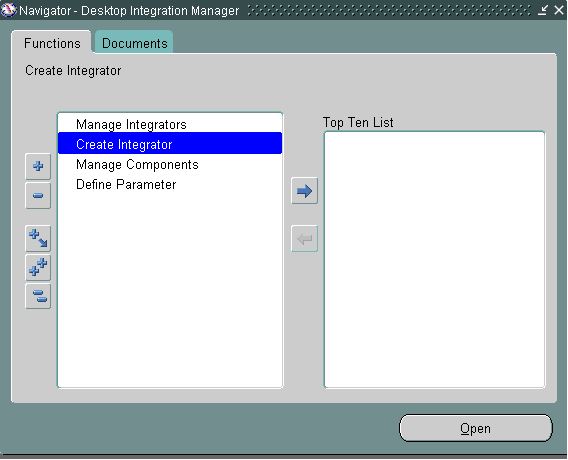
Navigate to -->Desktop Integration Manager - > Create Integrator


Step 1 :

Click on Create Integrator. Below page will open and enter the required details and select the checkbox ‘Display in Create Documents Page’ and click on the Next Button

Integrator Name: Custom Webadi Test Template
Internal Name: XXCUST_WEBADI_TEMPLATE
Application: Projects


Step2:

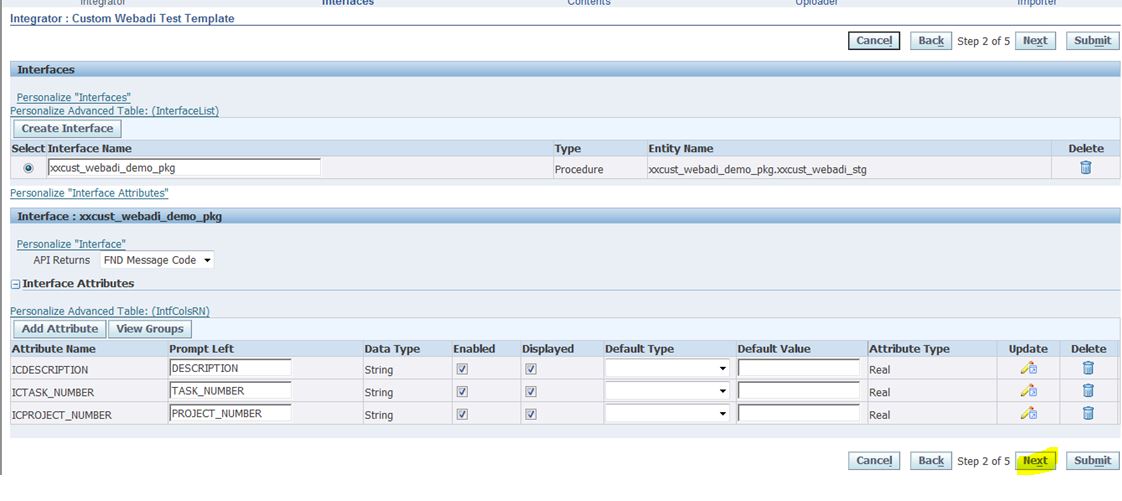
Enter the Interface Name :xxcust_webadi_demo_pkg
Interface Type: Select API Procedure from drop down list
Package Name :xxcust_webadi_demo_pkg(Give the package name as mentioned in step2)
Procedure Name:xxcust_webadi_stg(Select the main procedure name of the package:xxcust_webadi_demo_pkg)
API Returns : Select FND Message Code from the list of values. This will help to show the error message in the webadi template


Click on Apply button and the below page will open.


click on the select radio button as highlighted above and the below page will open


To create list of value for the webadi column,click on the pencil button as highlighted below and enter the details

Validation Type: Table
Id column: segment1(column name)
Meaning: segment1(column name)
Validation Entity: pa_projects_all(table name)
Lov Type : Pop up List


 save the details and click on Next
Step 3:


click on Next .
Step 4 :


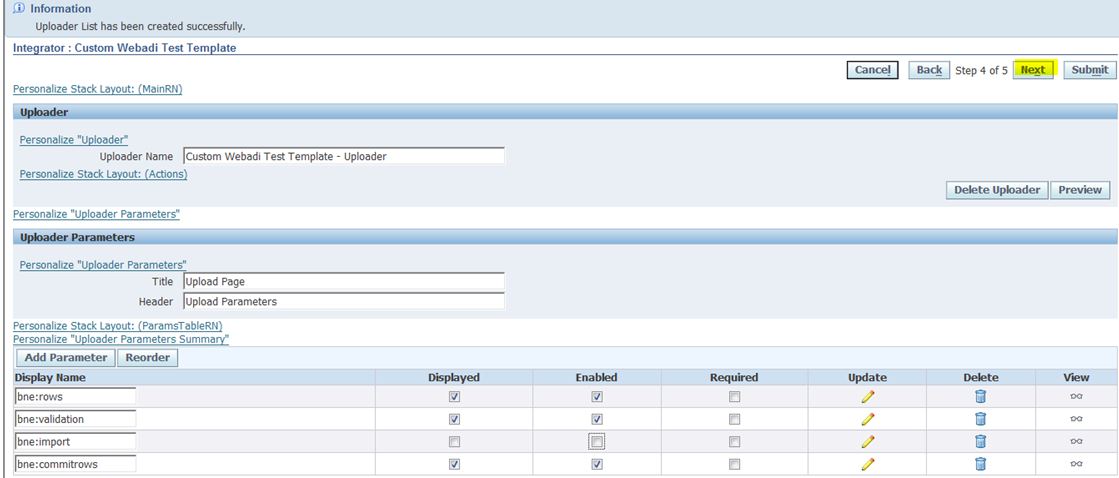
select the From template from list of values as mentioned below


Click on create button


Click on Next
Step 5:


click on Submit


Custom
 integrator is ready now.

4.Create the Layout.
Navigate to Desktop Integrator --> Define Layout


Select Integrator name(We have created from the above steps) from the drop down list.


click on Go button


click on Create


Enter Layout Name and click on Next


click on Next


click on Apply


Integrator Layout is created successfully.

                            
Download the Webadi Template

Navigate to Desktop Integrator --> Create Document


Step 1 :


select the Integrator name from drop down list and click on Next


click on Next


click button Create Document


Click on Open


Click on Allow and wait till the below Webadi template creates


 Webadi Template with List of Values

OAF Importer commands

OAF Importer commands

OAF Importer commands

Page Importer:
java oracle.jrad.tools.xml.importer.XMLImporter $JAVA_TOP/xx/oracle/apps/po/custom/webui/PoDummyPG.xml -username apps -password apps -dbconnection "(DESCRIPTION=(ADDRESS=(PROTOCOL=tcp)(HOST=xxx)(PORT=1522))(CONNECT_DATA=(SERVICE_NAME=XXX)))" -rootdir $JAVA_TOP

JPX Importer:
java oracle.jrad.tools.xml.importer.JPXImporter $JAVA_TOP/xx/oracle/apps/icx/lov/server/XXPrj.jpx -username apps -password apps -dbconnection "(DESCRIPTION=(ADDRESS=(PROTOCOL=tcp)(HOST=xxx)(PORT=1522))(CONNECT_DATA=(SERVICE_NAME=xxx)))"

OAF Apache Bounce Steps in R12.2

OAF Apache Bounce Steps in R12.2

OAF Apache Bounce Steps in R12.2

Login to Putty

Step 1 : Perform the below steps to Set the environment

login as: appldev
appldev@xxx password: Enter password
[appldev@xxx ~]$ cd ../..
[appldev@xxx ~]$ cd /u01/EBSDEV/APPS
[appldev@xxx APPS]$ . EBSapps.env run

  E-Business Suite Environment Information
  ----------------------------------------
  RUN File System                : /u01/EBSDEV/APPS/fs1/EBSapps/appl
  PATCH File System            : /u01/EBSDEV/APPS/fs2/EBSapps/appl
  Non-Editioned File System : /u01/EBSDEV/APPS/fs_ne

DB Host: xxx  Service/SID: EBSDEV

Sourcing the RUN File System ...

Step 2 : Run the adcgnjar to register the OAF changes to the weblogic server

[appldev@xxx APPS]$ cd $AD_TOP/bin
[appldev@xxx bin]$ adcgnjar

                     Copyright (c) 2002, 2012 Oracle Corporation
                        Redwood Shores, California, USA

                            AD Custom Jar Generation

                                 Version 12.2.0

NOTE: You may not use this utility for custom development
      unless you have written permission from Oracle Corporation.

Enter the APPS username: apps

Enter the APPS password:

customall.jar generated successfully.

Step 3 : Perform the below steps to stop the server

[appldev@xxx bin]$ cd $ADMIN_SCRIPTS_HOME
[appldev@xxx scripts]$ admanagedsrvctl.sh stop oacore_server1

You are running admanagedsrvctl.sh version 120.14.12020000.11

Enter the WebLogic Admin password:
Stopping oacore_server1...
Refer /u01/EBSDEV/APPS/fs1/inst/apps/EBSDEV_xxx/logs/appl/admin/log/adoacorectl.txt for details

Server specific logs are located at /u01/EBSDEV/APPS/fs1/FMW_Home/user_projects/domains/EBS_domain_EBSDEV/servers/oacore_server1/logs

admanagedsrvctl.sh: exiting with status 0


admanagedsrvctl.sh: check the logfile /u01/EBSDEV/APPS/fs1/inst/apps/EBSDEV_xxx/logs/appl/admin/log/adoacorectl.txt for more information ...

Step 4 : Perform the below steps to start the server

[appldev@xxx scripts]$ admanagedsrvctl.sh start oacore_server1

You are running admanagedsrvctl.sh version 120.14.12020000.11

Enter the WebLogic Admin password:

Calling txkChkEBSDependecies.pl to perform dependency checks for oacore_server1
*** ALL THE FOLLOWING FILES ARE REQUIRED FOR RESOLVING RUNTIME ERRORS
*** Log File = /u01/EBSDEV/APPS/fs1/inst/apps/EBSDEV_xxx/logs/appl/rgf/TXK/txkChkEBSDependecies_Sun_Feb_25_16_52_39_2018/txkChkEBSDependecies_Sun_Feb_25_16_52_39_2018.log
Perl script txkChkEBSDependecies.pl got executed successfully

Starting oacore_server1...

Server specific logs are located at /u01/EBSDEV/APPS/fs1/FMW_Home/user_projects/domains/EBS_domain_EBSDEV/servers/oacore_server1/logs

admanagedsrvctl.sh: exiting with status 0

admanagedsrvctl.sh: check the logfile /u01/EBSDEV/APPS/fs1/inst/apps/EBSDEV_xxx/logs/appl/admin/log/adoacorectl.txt for more information ...


[appldev@xxx scripts]$

Useful AOL Queries

Useful AOL Queries

To get the concurrent program file name (procedure / pkg name) based on the concurrent program name

select fct.user_concurrent_program_name,
          fcp.concurrent_program_name,
          fe.execution_file_name,
          fl.meaning execution_method
from fnd_concurrent_programs_tl fct,
        fnd_concurrent_programs fcp,
        fnd_executables fe,
        fnd_lookups fl
where upper(fct.user_concurrent_program_name) = upper('concurrent program')
and  fct.concurrent_program_id = fcp.concurrent_program_id
and  fe.executable_id = fcp.executable_id
and  fl.lookup_code = fe.execution_method_code
and  fl.lookup_type = 'CP_EXECUTION_METHOD_CODE'


To find from which responsibility a concurrent program can be run


SELECT distinct
  a.user_concurrent_program_name,
  a.description,
  request_group_name,
  e.responsibility_name
FROM
  fnd_concurrent_programs_tl a,
  fnd_request_groups b,
  fnd_request_group_units c,
  fnd_responsibility d,
  fnd_responsibility_tl e
WHERE
  a.concurrent_program_id = c.request_unit_id  
and b.request_group_id = c.request_group_id
and b.request_group_id = d.request_group_id
and d.responsibility_id = e.responsibility_id
and a.application_id = b.application_id
and b.application_id = c.application_id
and d.application_id = e.application_id
and a.concurrent_program_id = :p_conc_program_id


List of responsibilities assigned to user

SELECT fu.user_name,
       frt.responsibility_name,
       furg.start_date,
       furg.end_date
  FROM fnd_user fu,
       fnd_user_resp_groups_direct furg,
       fnd_responsibility_vl frt
 WHERE     fu.user_id = furg.user_id
       AND frt.responsibility_id = furg.responsibility_id
       AND frt.application_id = furg.responsibility_application_id
       AND NVL (furg.end_date, SYSDATE + 1) > SYSDATE
       AND NVL (frt.end_date, SYSDATE + 1) > SYSDATE
       AND fu.user_name = upper( :p_user_name);


Concurrent Program and Executable Details
The following SQL query provide you executable file name ,top name , etc...

--Oracle Applications Query to get the actual concurrent program file executable if we know the concurrent program name

SELECT b.user_concurrent_program_name, b.concurrent_program_name,
a.user_executable_name,
DECODE (a.execution_method_code,
'I', 'PL/SQL Stored Procedure',
'H', 'Host',
'S', 'Immediate',
'J', 'Java Stored Procedure',
'K', 'Java concurrent program',
'M', 'Multi Language Function',
'P', 'Oracle reports',
'B', 'Request Set Stage Function',
'A', 'Spawned',
'L', 'SQL*Loader',
'Q', 'SQL*Plus',
'E', 'Pearl concurrent Programm',
'Unkown Type'
) TYPE,
a.execution_file_name, a.execution_file_path, a.application_name,
c.basepath
FROM fnd_executables_form_v a,
fnd_concurrent_programs_vl b,
fnd_application c
WHERE a.application_id = c.application_id
AND a.executable_id = b.executable_id
AND a.application_id = b.application_id
AND a.executable_id > 4
AND b.user_concurrent_program_name LIKE '%Sales%Bill%Out%'

Query to get the list of responsibility's to which concurrent program has assigned

 SELECT DISTINCT *
           FROM apps.fnd_responsibility_tl
          WHERE responsibility_id IN (
                   SELECT responsibility_id
                     FROM apps.fnd_responsibility_vl
                    WHERE request_group_id IN (
                             SELECT request_group_id
                               FROM apps.fnd_request_group_units
                              WHERE request_unit_id =
                                       (SELECT DISTINCT concurrent_program_id
                                                   FROM Apps.fnd_concurrent_programs_tl
                                                  WHERE user_concurrent_program_name =
                                                           ''))
                      AND end_date IS NULL)
 AND "LANGUAGE" LIKE 'US'
 ORDER BY responsibility_name;


Script to find Scheduled concurrent programs and request sets
SELECT
A.REQUEST_ID,
B.USER_NAME,
C.USER_CONCURRENT_PROGRAM_NAME,
C.ARGUMENT_TEXT
FROM
FND_CONCURRENT_REQUESTS A,
FND_USER B,
FND_CONC_REQ_SUMMARY_V C
WHERE
B.USER_ID = A.REQUESTED_BY
AND A.REQUEST_ID = C.REQUEST_ID
AND A.REQUESTED_START_DATE > SYSDATE
AND A.HOLD_FLAG = 'N'
AND A.STATUS_CODE IN ('Q','I')
AND B.USER_NAME LIKE '%'
AND A.DESCRIPTION LIKE '%'
ORDER BY
A.REQUEST_ID;


Input program name to get list of value sets using in this program

SELECT ffvs.flex_value_set_name,
       fcp.user_concurrent_program_name,
       fat.application_name,
       fdfc.column_seq_num Seq,
       fdfc.form_left_prompt "Parameter Name",
       fdfc.enabled_flag Active
  FROM FND_DESCR_FLEX_COL_USAGE_VL fdfc,
       fnd_flex_value_sets ffvs,
       fnd_concurrent_programs_vl fcp,
       fnd_application_tl fat
 WHERE 1 = 1 AND ffvs.flex_value_set_id = fdfc.flex_value_set_id
       AND fdfc.descriptive_flexfield_name =
              '$SRS$.' || fcp.concurrent_program_name
       AND fat.language = USERENV ('LANG')
       AND fcp.application_id = fat.application_id
       AND fcp.user_concurrent_program_name LIKE :p_programsename -- Enter program name
;

Input value set name to get list of concurrent programs using this value set

SELECT ffvs.flex_value_set_name, fcp.user_concurrent_program_name,
       fat.application_name,
       fdfc.column_seq_num Seq,
       fdfc.form_left_prompt "Parameter Name",
       fdfc.enabled_flag Active
  FROM FND_DESCR_FLEX_COL_USAGE_VL fdfc,
       fnd_flex_value_sets ffvs,
       fnd_concurrent_programs_vl fcp,
       fnd_application_tl fat
 WHERE 1 = 1 AND ffvs.flex_value_set_id = fdfc.flex_value_set_id
       AND fdfc.descriptive_flexfield_name =
              '$SRS$.' || fcp.concurrent_program_name
              and fat.language =userenv('LANG')
       AND fcp.application_id = fat.application_id    
       AND ffvs.flex_value_set_name = :p_valuesetname  -- Enter value set name

Link between AP and GL in R/12
------------------------------
AP_INVOICES_ALL --> Invoice_id = APPLIED_TO_SOURCE_ID_NUM_1 <-- br="" xla_distribution_links="">
Also

AP_INVOICE_DISTRIBUTIONS_ALL -->INVOICE_DISTRIBUTION_ID = SOURCE_DISTRIBUTION_ID_NUM_1 <-- br="" xla_distribution_links="">
/*********************************************************
*PURPOSE: To find out profile option Values              *
**********************************************************/
SELECT DISTINCT POT.PROFILE_OPTION_NAME "PROFILE_CODE"
  , POT.USER_PROFILE_OPTION_NAME "PROFILE_NAME"
       , DECODE (a.profile_option_value
             , '1', '1 (may be "Yes")'
             , '2', '2 (may be "No")'
             , a.profile_option_value
              ) "PF_VALUE"
     , DECODE (a.level_id
             , 10001, 'Site'
             , 10002, 'Application'
             , 10003, 'Responsibility'
             , 10004, 'User'
             , 10005, 'Server'
             , 10006, 'Organization'
 , a.level_id
              ) "LEVEL_IDENTIFIER"
     , DECODE (a.level_id
             , 10002, e.application_name
             , 10003, c.responsibility_name
             , 10004, D.USER_NAME
             , 10005, F.HOST || '.' || F.DOMAIN
             , 10006, g.name
             , '-'
              ) "LEVEL_NAME"

FROM fnd_application_tl e ,
  fnd_user d ,
  fnd_responsibility_tl c ,
  fnd_profile_option_values a ,
  fnd_profile_options b ,
  fnd_profile_options_tl pot ,
  fnd_nodes f ,
  hr_all_organization_units g
WHERE 1=1
AND UPPER(pot.USER_PROFILE_OPTION_NAME) LIKE UPPER('MO: Default Operating Unit')
AND pot.profile_option_name = b.profile_option_name
AND b.application_id        = a.application_id(+)
AND b.profile_option_id     = a.profile_option_id(+)
AND a.level_value           = c.responsibility_id(+)
AND a.level_value           = d.user_id(+)
AND a.level_value           = e.application_id(+)
AND a.level_value           = f.node_id(+)
AND a.level_value           = g.organization_id(+)
AND pot.LANGUAGE            ='US'
ORDER BY PROFILE_NAME ,
  LEVEL_IDENTIFIER ,
  LEVEL_NAME ,
  PF_VALUE
  ;

/********************************************************************
*PURPOSE: To list information about Executable, Concurrent Program  *
*          and its Parameters                                       *
*********************************************************************/

SELECT DISTINCT fcpl.user_concurrent_program_name "Concurrent Program Name",
  fcp.concurrent_program_name "Short Name"                                 ,
  fat.application_name                                                     ,
  fl.meaning execution_method                                              ,
  fe.execution_file_name                                                   ,
  fcp.output_file_type                                                     ,
  fdfcuv.column_seq_num "Column Seq Number"                                ,
  fdfcuv.end_user_column_name "Parameter Name"                             ,
  fdfcuv.form_left_prompt "Prompt"                                         ,
  fdfcuv.enabled_flag " Enabled Flag"                                      ,
  fdfcuv.required_flag "Required Flag"                                     ,
  fdfcuv.display_flag "Display Flag"                                       ,
  fdfcuv.flex_value_set_id "Value Set Id"                                  ,
  ffvs.flex_value_set_name "Value Set Name"                                ,
  flv.meaning "Default Type"                                               ,
  fdfcuv.default_value "Default Value"
   FROM fnd_concurrent_programs fcp ,
  fnd_concurrent_programs_tl fcpl   ,
  fnd_descr_flex_col_usage_vl fdfcuv,
  fnd_flex_value_sets ffvs          ,
  fnd_lookup_values flv             ,
  fnd_lookups fl                    ,
  fnd_executables fe                ,
  fnd_executables_tl fet            ,
  fnd_application_tl fat
  WHERE 1                     = 1
AND fcp.concurrent_program_id = fcpl.concurrent_program_id
AND fcp.enabled_flag          = 'Y'
AND fcpl.user_concurrent_program_name LIKE 'Workflow Background Process' --
AND fdfcuv.descriptive_flexfield_name = '$SRS$.'
  || fcp.concurrent_program_name
AND ffvs.flex_value_set_id = fdfcuv.flex_value_set_id
AND flv.lookup_type(+)     = 'FLEX_DEFAULT_TYPE'
AND flv.lookup_code(+)     = fdfcuv.default_type
AND fcpl.LANGUAGE          = 'US'
AND flv.LANGUAGE(+)        = 'US'
AND fl.lookup_type         ='CP_EXECUTION_METHOD_CODE'
AND fl.lookup_code         =fcp.execution_method_code
AND fe.executable_id       = fcp.executable_id
AND fe.executable_id       =fet.executable_id
AND fet.LANGUAGE           = 'US'
AND fat.application_id     =fcp.application_id
AND fat.LANGUAGE           = 'US'
ORDER BY fdfcuv.column_seq_num;

5. How to find the latest version of a file on a given instance

SELECT   sub.filename
       , sub.VERSION
    FROM (SELECT adf.filename filename
               , afv.VERSION VERSION
               , RANK () OVER (PARTITION BY adf.filename ORDER BY afv.version_segment1 DESC
                , afv.version_segment2 DESC
                , afv.version_segment3 DESC
                , afv.version_segment4 DESC
                , afv.version_segment5 DESC
                , afv.version_segment6 DESC
                , afv.version_segment7 DESC
                , afv.version_segment8 DESC
                , afv.version_segment9 DESC
                , afv.version_segment10 DESC
                , afv.translation_level DESC) AS rank1
            FROM ad_file_versions afv
               , (SELECT filename
                       , app_short_name
                       , subdir
                       , file_id
                    FROM ad_files
                   WHERE UPPER (filename) LIKE UPPER ('%&filename%')) adf
           WHERE adf.file_id = afv.file_id) sub
   WHERE rank1 = 1
ORDER BY 1


You can enter partial file names and the search is not case sensitive.


1. How to check if a patch is applied?
select * from ad_bugs
where bug_number = :bug_number;

select * from ad_applied_patches
where patch_name = :bug_number;

SELECT DISTINCT a.bug_number, e.patch_name, c.end_date, b.applied_flag
FROM ad_bugs a,
  ad_patch_run_bugs b,
  ad_patch_runs c,
  ad_patch_drivers d,
  ad_applied_patches e
WHERE a.bug_id = b.bug_id
AND b.patch_run_id = c.patch_run_id
AND c.patch_driver_id = d.patch_driver_id
AND d.applied_patch_id = e.applied_patch_id
AND a.bug_number LIKE ':bug_number'
ORDER BY 1 DESC ;

Query to find Form Personalization

SELECT ffv.form_id          "Form ID",
       ffv.form_name        "Form Name",
       ffv.user_form_name   "User Form Name",
       ffv.description      "Form Description",
       ffcr.sequence        "Sequence",
       ffcr.description     "Personalization Rule Name"
  FROM fnd_form_vl             ffv,
       fnd_form_custom_rules   ffcr
 WHERE ffv.form_name = ffcr.form_name
 ORDER BY ffv.form_name, ffcr.sequence;

-------------------------------------------------------------------------------
-- Query to find all responsibilities of a user
-------------------------------------------------------------------------------
SELECT fu.user_name                "User Name",
       frt.responsibility_name     "Responsibility Name",
       furg.start_date             "Start Date",
       furg.end_date               "End Date",    
       fr.responsibility_key       "Responsibility Key",
       fa.application_short_name   "Application Short Name"
  FROM fnd_user_resp_groups_direct        furg,
       applsys.fnd_user                   fu,
       applsys.fnd_responsibility_tl      frt,
       applsys.fnd_responsibility         fr,
       applsys.fnd_application_tl         fat,
       applsys.fnd_application            fa
 WHERE furg.user_id             =  fu.user_id
   AND furg.responsibility_id   =  frt.responsibility_id
   AND fr.responsibility_id     =  frt.responsibility_id
   AND fa.application_id        =  fat.application_id
   AND fr.application_id        =  fat.application_id
   AND frt.language             =  USERENV('LANG')
   AND UPPER(fu.user_name)      =  UPPER('AMOHSIN')  --
   -- AND (furg.end_date IS NULL OR furg.end_date >= TRUNC(SYSDATE))
 ORDER BY frt.responsibility_name;

Query to find Oracle Alert

The following query finds all enabled custom alerts. You can comment out the very last two lines (alr.enabled_flag and alr.created_by) to display all both enabled and disabled alerts.

-------------------------------------------------------------------------------
-- Query to find Custom Oracle Alert
-------------------------------------------------------------------------------
SELECT alr.application_id,
       alr.alert_id,
       alr.alert_name,
       alr.start_date_active,
       alr.description,
       alr.sql_statement_text
  FROM alr.alr_alerts alr
 WHERE 1=1
   AND alr.created_by <> 1      -- show only custom alerts
   AND alr.enabled_flag = 'Y';  -- show only enabled alerts

Query to find tables which are having common columns is given below:

select  a.column_name,a.table_name
  from  dba_tab_columns a,
        dba_tab_columns b
  where  a.owner = 'TABLE-OWNER'
    and b.owner = 'TABLE-OWNER'
    and b.column_name = a.column_name
    and a.column_name=upper('&column_name'); 
Difference Between R12 and 11i Modules Wise

Difference Between R12 and 11i Modules Wise

Difference Between R12 and 11i Modules Wise

First we discuss about  MOAC and then Modules wise what changes comes 11i to R12.

Multi – Org Concept in Oracle Apps R12: MOAC (Multiorg Access Control)

Multi-Org in simple term means the implementation of multiple business units (or Organization) under a single installation of Oracle Applications. 
The concept of Multi-Org will manage the operations of an enterprise which has got subsidiaries across globe under a single oracle apps window, 
taking appropriate care of data security and data maintenance.
It decides how transactions flow through different organizations and how those organizations interact with each other.

1. By MOAC (Multiorg Access Control) , we can be able to access  multiple operating units at a time.
2. Mutiorg views were replaced with MOAC Based synonyms.
3. MO:Security Profile is a new profile added in R12.
4. VPD(Virtual Private Database) System will take care of  Data security in R12

Org Initialisation process in R12 :

begin
   mo_global.set_policy_context('S','204');
 end;

MOAC Synonym Initialisation :
----------------------------
 begin
   FND_GLOBAL.APPS_INTILISE('APPLICATION_ID','RESPONSIBILTY_ID,'USER_ID');
   MO_GLOBAL.INIT('SQLAP'); -- Application Short Name
 end;


Modules Wise change 11i to R12

1) General Ledger :

1.gl_sets_of_books table was replaced with gl_ledgers and gl_ledger_Sets.
2.4c’s comes in R12  Currency,Calendar,Chart of accounts, Accounting Convention , In 11i,  there are 3c’s ( Currency,Calendar,Chart of accounts).


2) Accounts Payable :

1.ap_invoice_lines_all table added in R12.
2.ap_invoice_distributions_all table populates the data when ever invoice gets accounted.
3.Supplier form was converted from form based solution to webbased solution.
4.po_vendors tables replaced with ap_suppliers tables.
5.Supplier and customer information was defined together Under TCA(Trading Community Architecture).
6.Accounting Tables were modified.
7.Both supplier and customer bank information was defined under payments(New application in R12) Application.


11i Tables                    R12 Tables
po_vendors                 ap_suppliers
po_vendor_sites_all ap_supplier_sites_all
po_vendor_contacts ap_supplier_contacts
ap_banks                 ce_banks
ap_bank_branches ce_bank_branches
ap_ae_headers_all xla_ae_headers
ap_ae_lines_all         xla_ae_lines
ap_ae_accounting_events xla_events.


3) Suppliers

11i Tables                 R12 Tables
po_vendors                 ap_suppliers
po_vendor_sites_all ap_supplier_sites_all
po_vendor_contacts ap_supplier_contacts.

Additional supplier related tables in IBY (Payments) and HZ (TCA):
IBY_EXTERNAL_PAYEES_ALL – stores Payee(supplier) information.
HZ_PARTIES – Party data for the suppliers.
HZ_PARTY_SITES – Party site data for the supplier sites.


4) Invoices:

In 11i , Only two table ,AP_INVOICES_ALL, AP_INVOICE_DISTRIBUTIONS_ALL but R12 Additional table  AP_INVOICE_LINES_ALL

Allocations – AP_CHRG_ALLOCATIONS_ALL is obsolete in R12.


5) Bank Account Details
     
11i                                                           R12
AP_BANK_ACCOUNTS_ALL           CE_BANK_ACCOUNTS
AP_BANK_ACCOUNT_USES_ALL  CE_BANK_ACCT_USES_ALL
AP_CHECK_STOCKS_ALL           CE_PAYMENT_DOCUMENTS

6) Sub-ledger Accounting

SLA is rule based accounting hub in Release 12 (R12) of the Oracle E-Business Suite of applications. SLA is used to derive all attributes required to account a transaction in Oracle General Ledger.

SLA can be configured in many ways to help derive accounting attributes such as the entered amount, accounted amount, date, currency code as well as the more complex attributes like ledger, code combination ID (CCID). SLA accounting attributes are interfaced to GL from SLA, thus in R12 no sub ledger application module (i.e. AP, PO, PA etc) interfaces the transactions directly to GL.

Create Accounting :  Subledger tables and xla_events -> xla_ae_headers, xla_ae_lines and xla_distribution_links
Transfer to GL   -: xla_ae_headers and xla_ae_lines -> gl_je_headers and gl_je_lines
Post to GL        : gl_je_headers and gl_je_lines -> gl_balances
Subledger Accounting Balances Update  :  xla_ae_headers and xla_ae_lines -> xla_control_balances.


11i                                                             R12
AP_ACOCUNTING_EVENTS_ALL     XLA_EVENTS
AP_AE_HEADERS_ALL                     XLA_AE_HEADERS
AP_AE_LINES_ALL                             XLA_AE_LINES


7) Trial Balance:

New R12 Table
XLA_TRIAL_BALANCES
AP_LIABILITY_BALANCE-> not used in new R12 transactions
AP_TRIAL_BALANCE -> not used in new R12 transactions.


8) Taxes:

Functionality provided by E-Business Tax
New tables in R12
ZX_LINES – Detailed Tax lines for the invoice (trx_id = invoice_id)
ZX_LINES_SUMMARY – Summary tax lines for the invoice (trx_id = invoice_id)
ZX_REC_NREC_DIST – Tax distributions for the invoice (trx_id = invoice_id)
ZX_LINES_DET_FACTORS – Tax determination factors for the invoice (trx_id = invoice_id)


9) Order Management

RA_CUSTOMERS ,RA_SITE_USES_ALL ,RA_ADDRESSES_ALL views were removed in R12. in place of ra_customers,ra_site_uses_all,ra_addresses_all views need to use the below mentioned base tables.

HZ_CUST_ACCOUNTS
HZ_PARTIES
HZ_CUST_SITE_USES_ALL
HZ_CUST_ACCT_SITES_ALL
HZ_PARTY_SITES
HZ_LOCATIONS

Tuesday, August 22, 2017

XML publisher’Reports (RTF) Check printing


I have a customer who wants to convert their 40+ Oracle Apps reports to ‘XML publisher’ Reports. These reports are fall in categories of AR invoice report, check printing report and PO print report which they are printing on pre-printed (pre-defined) stationary.
Just a little background of pre-printed stationary report’s layout where there is a fix Header section and fix Detail Section Table. Detail section table should always have fix table height, in the sense it should always have fix number of rows in the table no matter how many rows returned by actual report run. For example Invoice stationary has fix 30 rows in line detail table, and Actual report run is returning only 5 rows then rest 25 blank rows should be generatedprogrammatically.


So far there are solutions available which are talking about fixing table height for the 1st pages onwards not for the first page itself, i.e. where actual report run is returning lines which are less than lines_fixed_per_page.
 For example Invoice run is returning only 5 rows where as pre-printed stationary has fixed 30 lines per page.I struggled a lot to get this solution and now I got this and sharing it in this whitepaper.

So far it has not been discovered because of the limitation of for-loop in XSL-FO (XML Technology).Limitation I mean is ,we can not write loop like ‘ for (i=10;i<15 em="" i="" in="" xml.="" xml="">for’
 loop will always iterate till it gets data, if we want to go beyond that then we can not go. I mean we can write for loop based on data value.
To overcome this problem, I have used Sub-template concept which I am calling recursively.


Detail Solution
 I am giving this solution for Standard Check Printing Report. Tree structure of data (Sample XML data is as follow).
      -- Top Most root -- Header
      21897
      2205
      
         -- Inner loop - Line Section
          1
          ERS-20-SEP-06-243
        
         -- Inner loop - Line Section
          2
          ERS-20-SEP-06-244


Below is the step-step guide which I follow.

1) Open the Outermost for loop --  G_CHECKS

2) Declare Global Variable called ‘no_of_lines_per_page’  -- In this case I have fixed 40 lines per page.

3) Declare incontext variable for inner group (G_INVOICES), variable is called ‘inner_group’

4) Open the Inner Loop
   

5) Before putting any elements with the help of current record pointer 'position()’, I am checking if the current position is modulizing with the no_of_lines_per_page equals zero or not. If it reaches the first record after modulizing then I will create local variable 'first_rec' and initialize it with '0'.

Note : -- Above 3 steps ( 3,4,5) are created under ‘V_inner_group_And_V_First_rec’ form-field. Here there is limitation of Microsoft-word. We can enter upto 138 characters only in ‘Status’ field of ‘Add help text’ button.If you want to add more , you can do this by clicking on ‘Help Key’  which is adjacent to ‘Status’ tab.

6) If above condition holds true then we will iterate the inner loop.

7) I will check with the help of current record pointer 'position()' that the current record position is either greater than 'first_rec' i.e. the first record or less the 'no_of_lines_per_page' value set up earlier. If it is then show the record otherwise not otherwise it will not go in loop.
   =$first_rec and position()<$first_rec+$no_of_lines_per_page?>

8) Here I am closing the inner for loop and if condition
   

9) Here I am checking if no_of_lines of invoice is modulizing with the no_of_lines_per_page equals to zero or not ,and the same time I am checking if $first_rec+$no_of_lines_per_page is greater than no_of_lines of invoice or not. This is important step for filling the blank rows.
count($inner_group))?>


10) Now I am calling sub-template recursively for filling the blank rows. While calling this template I am passing one parameter which is having value of no_of_rows to fill. Sub-template will have just one row table.

11) Sub-template declaration
   
   
   name="countdown">  


12) I have created page break after the fixed number of rows have been displayed.
   
      page
   

13) Finally closing outer if and inner for loop and outer for loop.
   

If you want more information then please contact me

Monday, August 21, 2017

RTF Template : Working with variables

Define Constant Variable
This variable remains constant for entire file


Assigning Group/Repeating Frame to Variable

Here DocumentPayable is a Group which is assigned to variable inner_group. So we can loop through this variable as below

Here you can also get total records in a group anytime using count($inner_group)

Incrementing Variable in Loop
Declare variable before loop and increment it inside loop as below


However, this variable is not referenced using $ symbol

Printing Variable ValueThe "xsl:value-of" element can be used to select the value of an XML element and add it to the output